
You can contact Tech Support at 1-866-390-3928. We are available 6:00 AM to 10:00 PM, 7 days a week, including holidays. Or you can try some basic troubleshooting on your own first, such as rebooting your router.
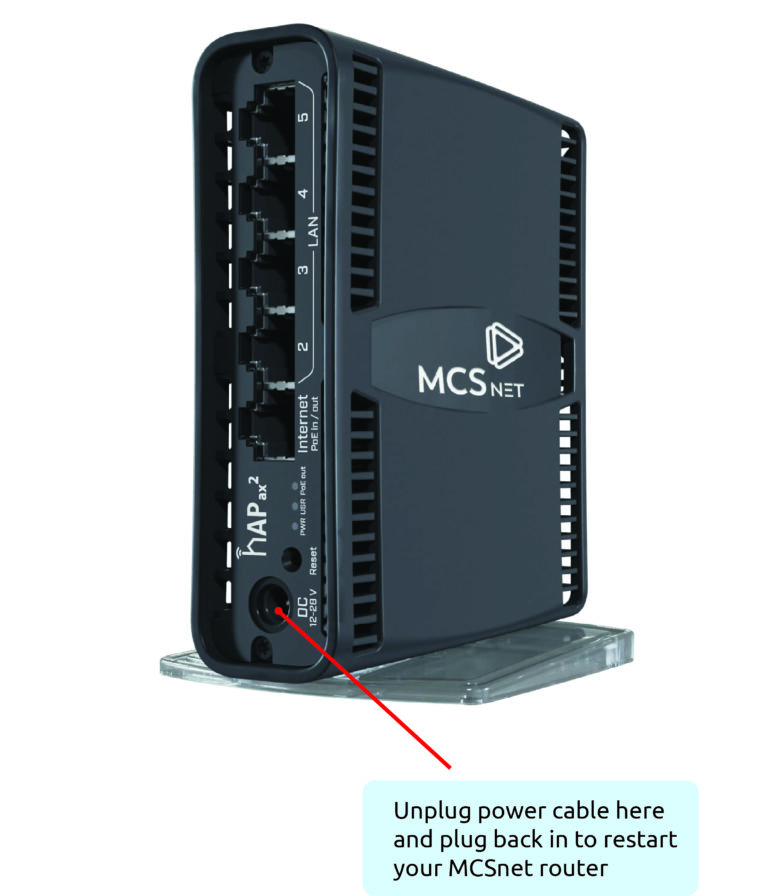
If your internet is having connection issues, try rebooting your router. Do this before trying a reset to factory settings.
If you are still having issues with your connection, please contact Tech Support.
You can check your internet speed conveniently and quickly by:
First you should eliminate the possibility of any problems on your computer or local network.If you are using a wireless connection with a wireless router, please be aware that 2.4 GHz phones, microwave ovens, baby monitors, and other electronic devices may interfere with your wireless network.
First of all, try rebooting your router and/or your computer or devices connected to your Wi-Fi. If you continue to experience constant Wi-Fi interruptions, Tech Support is available at 1-866-390-3928 ext. 2.
Watching TV shows or movies on the Netflix app uses varying amounts of data per hour, depending on the video quality. You can adjust your data usage settings by following the steps at the link. https://help.netflix.com/en/node/87
On your Amazon Prime TV app, go to settings on your TV app → click on Video → click on “HDR off”. This should help resolve the issue. If not, try exiting the app and restarting it.
Many devices often download updates or schedule large files to download when network usage is low. Devices such as Windows and Mac computers, and game consoles such as Playstation and Xbox can download extremely large files that take several hours to complete. These updates automatically download on their own unless the device is completely turned off.
Other devices such as Amazon Fire TV Sticks or Roku streaming devices will also continue to stream content if not shut off properly and autoplay is not disabled. Some of our customers complain about high usage only to find out that they were watching their Fire Stick on a Friday night, turned off their TV, and not the Fire Stick, and it continued to stream all weekend without the customer realizing it.
It’s always a good idea to double check the devices you have connected to your internet before walking away for long periods of time. For a summary of how much data certain services consume take a look at this post How Much Internet do I Need?
A lot of people don’t understand the difference between Wi-Fi and the internet and where Wi-Fi comes from. Wi-Fi refers to the signal between your router and your devices.
If you have a weak Wi-Fi signal on one of your devices then that means that they are either too far from the transmit source (router) or there are too many obstructions between the router and their device. Wi-Fi also uses wireless frequencies that are open and are utilized by many other devices such as Bluetooth devices, baby monitors, cordless phones, wireless cameras, Wi-Fi extenders, etc.
By this very nature Wi-Fi is not very reliable and its use should be minimized where possible. You can also find more information on our Wi-Fi page (link).
Our team is here to assist you 7 days a week, including holidays.
We aim to respond to all email inquiries within one business day.